Mode / 03
Active
/man
Playoff
discipline
discipline
01Scout
02Execute
03Risk review
 mancode
AI coding agent workflow harness
The right level of engineering discipline for every task. Reuse what exists, match the project, and go playoff mode only when the stakes demand it.
AI writes fast.
+ src/components/LogoutButton.tsx
+ src/styles/logout-button.css
+ src/theme/logout-tokens.ts
+ src/services/auth-controller.ts
+ src/hooks/useLogoutFlow.ts
<Button variant="default"
  onClick={handleLogout}>
  Logout
</Button>Start light. Add process only when risk earns it. mancode lets the same coding agent move from daily practice to production-grade review without changing tools. Ordinary Solo stays lightweight; governed tasks retain their original gates, with review depth guided by risk and new evidence.
solo
For everyday changes that need context, not ceremony—even with newer models that already self-review.
/manba
For defects that need a root cause and a real regression check.
/man
Align requirements, compare options, and approve a durable plan before choosing delivery depth.
/manteam
For teams that need shared decisions to survive across agent sessions.
/manps
For maintenance passes that surface debt without rewriting the project.
/man workflow
Every planning run leaves a readable trail under
.mancode/<namespace>/workflows/<ULID>/. After approval, assign delivery to solo or continue the Man workflow. Both paths retain the approved plan, scope, review, and acceptance gates.
mancode detects the project shape, available validation commands, existing components, CSS variables, and design signals. UI guidance only activates when the project actually has a UI.
your-project/
├── .mancode/
│   ├── shared/context/project.json
│   ├── local/cache/style-tokens.json
│   ├── local/workflows/<ULID>/
│   └── shared/team/
├── .claude/
├── .cursor/rules/
├── .agents/skills/
└── AGENTS.md

✓ context stays with the code
✓ no telemetry sentNew in 0.5.0
A new UI or visual redesign no longer starts from one silent default. When the direction is open, mancode asks the agent for 2–3 product-appropriate routes, the tradeoffs, and a recommendation. You choose. Then it builds one coherent system. Emoji remain valid in user-authored content, but never stand in for interface icons.
Configure the policyDistinct visual logic. Clear tradeoffs. One recommendation. No code until the direction is yours.
Keep the hierarchy, components, layout, and interaction patterns. Change only what the task requires.
Improve type, spacing, hierarchy, states, and responsive behavior without changing the product structure.
Allow one stronger composition and purposeful motion—after confirmation, inside the existing product scope.
mancode is a workflow layer, not another coding agent. Claude Code gets the richest native integration; other tools receive durable rules, skills, or instruction files.
mancode keeps goals, requirements, plans, validation results, and handoff notes under a stable TaskRef. A new chat or CLI session can resume that task, load bounded references, and read the required bodies by version without keeping the previous window open.
mancode context resume <TaskRef> --session <id> --client <client>Explicit identity
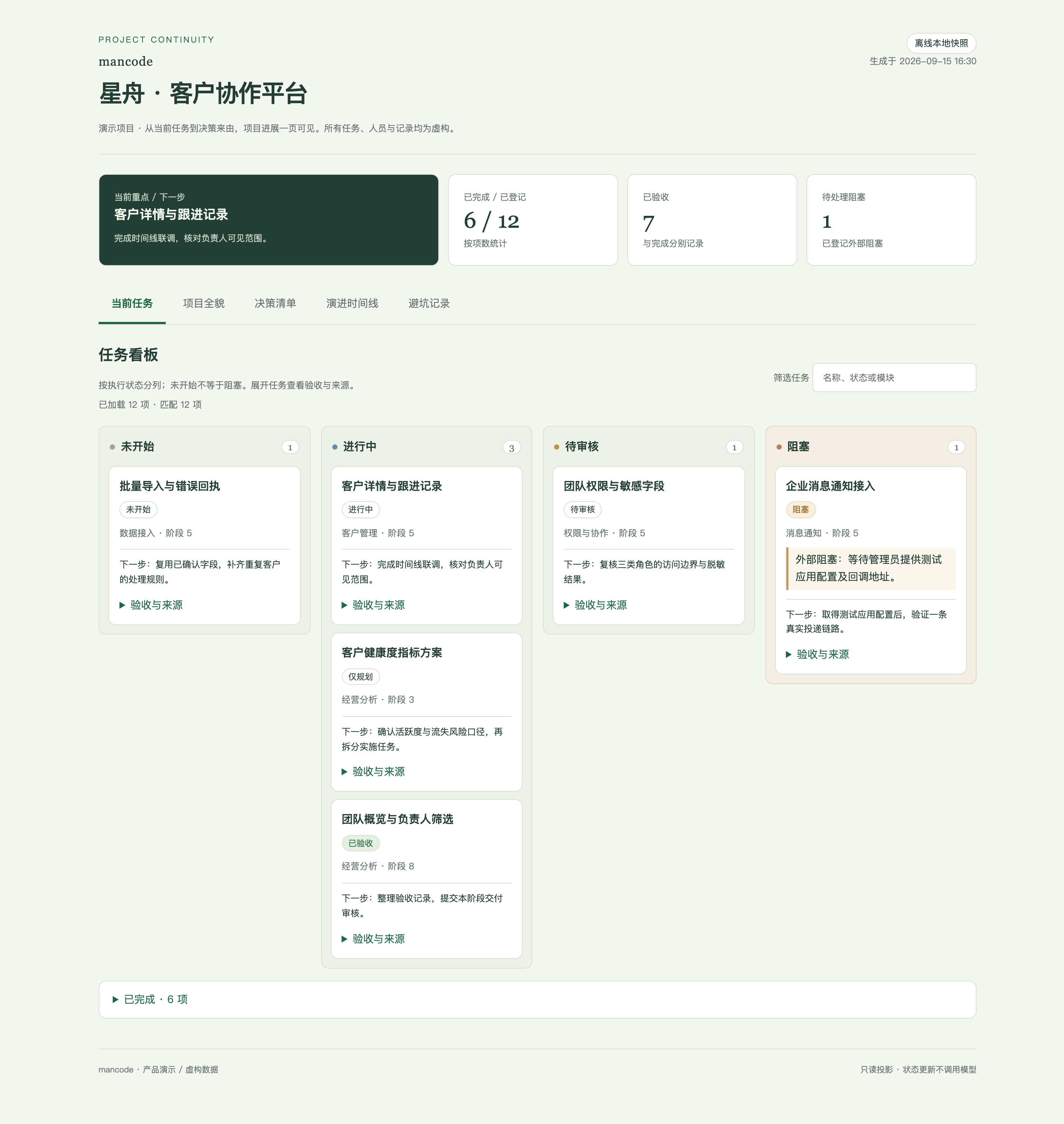
A task board, module overview, decisions, timeline, and lessons learned share the same registered project facts. Completions, blockers, and acceptance changes update the page. Rendering and idle refresh make no model calls.
Start with bounded references and read required bodies by version. A growing project does not put every document into every conversation.
Distinguish current, partially valid, and historical records. Follow sources to understand replacements and revocations.
Not started, in progress, in review, and blocked columns. Plan-only work stays marked; completed tasks are collapsed.
New projects generate HTML during initialization. Existing projects run mancode progress init. Offline files need no server.
Ready at the buzzer
No account, dashboard, API key, or new editor. Initialize it inside the project you already use—Windows CMD, PowerShell, Git Bash, macOS, and Linux are supported.
Read the docs ↗npm install -g mancode
cd your-project
mancode init
Less ceremony for the easy work.
More discipline for the work that matters.